

As organisations increasingly rely on Microsoft Azure to power their applications, infrastructure and digital services, managing cloud expenditure has become a critical part of IT strategy. While Azure provides flexibility, scalability and access to advanced technologies, cloud costs can grow quickly when resources are not monitored, managed or optimised effectively.
Unused virtual machines, oversized infrastructure, inefficient storage and poorly managed subscriptions can all contribute to unnecessary spending. Without clear visibility into resource consumption, these costs can accumulate over time and reduce the return on cloud investment.
Azure cost optimisation is about getting the best value from your cloud environment — reducing waste while maintaining performance, security, reliability and business continuity.
What Is Azure Cost Optimisation?
Azure cost optimisation is the ongoing process of reviewing cloud consumption, identifying inefficiencies and aligning infrastructure expenditure with actual business requirements.
It involves more than simply reducing the number of resources deployed. Organisations need to understand how their workloads operate, which services are essential and where existing resources can be used more efficiently.
Microsoft Azure offers several built-in tools to help organisations monitor and manage their expenditure, including Azure Cost Management, Azure Advisor and cost optimisation workbooks.
When combined with effective governance, these tools help IT teams make informed decisions, improve financial accountability and establish sustainable cloud management practices.
Why Do Azure Costs Increase?
Cloud expenditure often increases gradually rather than as a result of one major decision. Common causes include:
1. Underutilised or Oversized Virtual Machines
Virtual machines are frequently provisioned with more CPU, memory or capacity than workloads require. While additional capacity may initially provide a safety margin, retaining oversized resources can result in unnecessary ongoing costs.
Regularly reviewing performance metrics and utilisation trends helps identify opportunities to resize virtual machines without compromising application performance.
2. Unused Cloud Resources
Development, testing and temporary project environments can continue running long after they are needed. Other resources, such as unattached managed disks, unused public IP addresses and outdated snapshots, may also continue generating charges.
Identifying and safely removing unnecessary resources is one of the most practical ways to reduce avoidable Azure expenditure.
3. Inefficient Storage Management
Not all data requires the same storage performance or availability. Frequently accessed application data may need high-performance storage, while older records, archives and infrequently accessed files may be suitable for lower-cost storage tiers.
Implementing appropriate storage lifecycle policies can help reduce costs while preserving data availability, retention and recovery requirements.
4. Limited Cost Visibility
When resources are distributed across multiple subscriptions, departments and resource groups, it can be difficult to understand where the budget is being spent.
Inconsistent resource naming and missing cost-allocation tags can make it challenging to identify resource owners and assign expenditure to the correct business unit.
5. Inefficient Licensing and Pricing
Organisations may miss opportunities to reduce expenditure through eligible licensing benefits, Azure Reservations or Azure Savings Plans.
Reviewing usage patterns, existing entitlements and pricing commitments can help ensure that the organisation is paying an appropriate rate for its cloud services.
7 Practical Ways to Reduce Azure Cloud Costs
1. Use Azure Cost Management to Monitor Spending
Azure Cost Management provides visibility into cloud expenditure, consumption trends and budget performance.
IT and finance teams should regularly review costs by subscription, resource group, service and relevant business tags. Establishing budgets and configuring alerts can help identify unexpected increases before they become significant financial issues.
Regular reporting also improves forecasting and supports more informed cloud investment decisions.
2. Right-Size Azure Resources
Right-sizing involves matching resource capacity to actual workload requirements.
Use Azure Advisor recommendations and Azure Monitor performance metrics to identify virtual machines and other resources that may be overprovisioned.
Before making changes, assess utilisation over a representative period, including peak demand, month-end processing and seasonal workloads. Test proposed changes and maintain appropriate rollback procedures to minimise operational risk.
3. Automate Shutdowns for Non-Production Environments
Development, testing and staging environments do not always need to operate continuously.
Scheduling non-production virtual machines to stop outside business hours can reduce compute expenditure where workloads do not require continuous availability.
Automation can make this process consistent and reduce reliance on manual intervention. However, teams should verify dependencies, shutdown requirements and any continuing charges associated with storage, networking or other services.
4. Identify and Remove Unused Resources
Conduct regular reviews of cloud resources to identify services that are no longer required.
Areas to investigate include:
- Idle virtual machines and abandoned test environments.
- Unattached managed disks and obsolete snapshots.
- Unused public IP addresses and networking resources.
- Redundant storage and outdated deployment artefacts.
- Resources belonging to completed projects or decommissioned applications.
Before deleting any resource, confirm ownership, dependencies, backup requirements, retention obligations and disaster recovery needs. A resource that appears unused may still support an important business process.
5. Optimise Storage and Data Retention
Review storage usage, access frequency and performance requirements to determine whether data is held in the most appropriate tier.
Azure Blob Storage lifecycle management can help move eligible data to lower-cost tiers or delete data that has reached the end of its approved retention period.
Organisations should also review backup policies, retention periods and recovery objectives to ensure that storage optimisation does not undermine compliance or business continuity.
6. Review Azure Reservations and Savings Plans
For workloads with predictable, ongoing consumption, Azure Reservations and Azure Savings Plans for Compute may offer savings compared with applicable pay-as-you-go rates.
The right option depends on workload stability, service eligibility, flexibility requirements and the organisation’s expected usage.
Before committing, review existing coverage, utilisation and future infrastructure plans. Avoid purchasing long-term commitments solely to secure a discount if workloads may change or consumption may decline.
Eligible organisations should also assess Azure Hybrid Benefit to determine whether existing qualifying Windows Server or SQL Server licences can reduce relevant Azure costs.
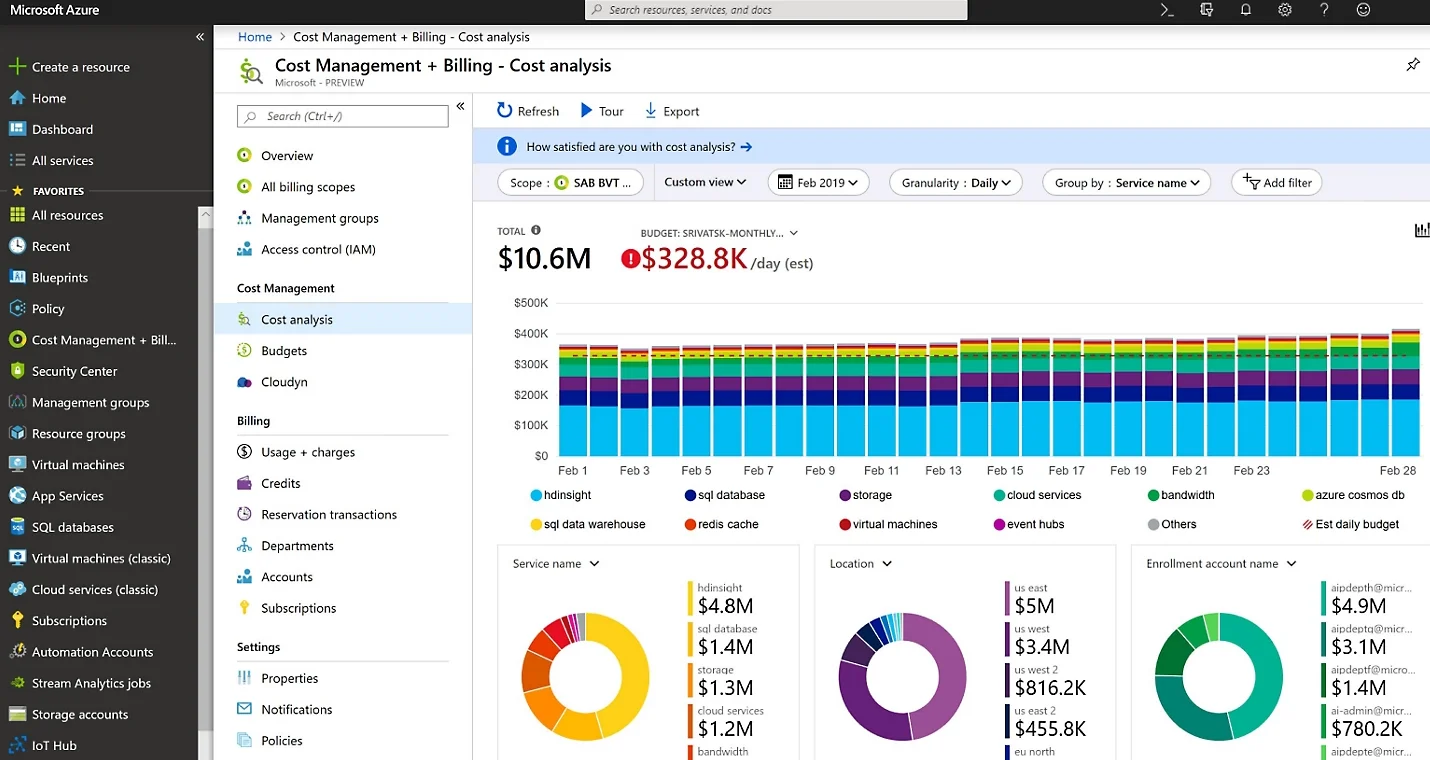
Credit: Microsoft Cost Management and Billing Cost Analysis dashboard
7. Strengthen Cloud Governance and Resource Tagging
Effective governance helps prevent unnecessary spending before it occurs.
Establish consistent resource naming conventions, mandatory ownership tags and cost-centre identifiers. Use Azure Policy and role-based access control to support approved deployment standards and appropriate access permissions.
Define clear responsibilities for approving new resources, reviewing expenditure and retiring infrastructure that is no longer required.
Strong governance improves accountability and helps ensure that cost optimisation becomes part of everyday cloud operations rather than an occasional corrective exercise.
The Role of Automation in Azure Cost Optimisation
Automation can help organisations maintain cost control as their Azure environments grow.
Automated monitoring, scheduled shutdowns, policy enforcement and resource lifecycle management reduce the administrative effort required to maintain an efficient cloud environment.
For example, an organisation can implement automated alerts when expenditure exceeds an agreed threshold, schedule development environments to stop outside working hours, and apply policies that require resource ownership information.
These controls help detect potential waste earlier and establish consistent management practices across multiple subscriptions and teams.
Automation should always include appropriate safeguards, exceptions and monitoring to ensure that cost controls do not interrupt critical workloads.
Establish a Continuous Azure Cost Optimisation Process
Azure cost optimisation should not be treated as a one-off project. Cloud consumption changes as applications evolve, workloads scale and business priorities shift.
A structured review process can help organisations maintain control over time.
Monthly reviews
- Compare actual expenditure against budgets and forecasts.
- Investigate unexpected cost increases.
- Review idle resources and Azure Advisor recommendations.
- Track completed optimisation actions and realised savings.
Quarterly reviews
- Reassess infrastructure sizing and storage strategies.
- Review licensing eligibility and pricing commitments.
- Evaluate resource ownership, tagging and governance compliance.
- Update forecasts based on planned projects and workload changes.
Ongoing activities
- Monitor significant changes in resource consumption.
- Apply approved governance policies to new deployments.
- Track optimisation opportunities and assign clear ownership.
- Validate savings after implementing changes.
Measuring both financial savings and operational outcomes helps ensure that optimisation efforts deliver sustainable value without compromising service quality.
Conclusion
Microsoft Azure provides organisations with the flexibility to scale technology resources in line with changing business requirements. However, achieving the full benefits of cloud computing requires active cost management and effective governance.
By monitoring expenditure, right-sizing resources, automating non-production shutdowns, optimising storage and reviewing pricing commitments, organisations can identify unnecessary spending and improve the efficiency of their Azure environments.
The most successful approach combines financial visibility, technical expertise and ongoing governance. Rather than focusing solely on reducing the monthly bill, organisations should aim to ensure that every cloud resource delivers measurable business value.
Start optimising your Azure environment today by reviewing your current expenditure, identifying your largest cost drivers and prioritising improvements that deliver meaningful savings without compromising performance, security or reliability.

